Logo by S Nelson - Contribute your own Logo!

END OF AN ERA, FRACTALFORUMS.COM IS CONTINUED ON FRACTALFORUMS.ORG

it was a great time but no longer maintainable by c.Kleinhuis contact him for any data retrieval,
thanks and see you perhaps in 10 years again

this forum will stay online for reference
News: Check out the originating "3d Mandelbulb" thread here
 
*
Welcome, Guest. Please login or register. December 02, 2025, 05:13:08 PM


Login with username, password and session length


The All New FractalForums is now in Public Beta Testing! Visit FractalForums.org and check it out!


Pages: [1]   Go Down
  Print  
Share this topic on DiggShare this topic on FacebookShare this topic on GoogleShare this topic on RedditShare this topic on StumbleUponShare this topic on Twitter
Author Topic: roughness against aliasing  (Read 1714 times)
0 Members and 2 Guests are viewing this topic.
Jesse
Download Section
Fractal Schemer
*
Posts: 1013


« on: May 25, 2010, 10:25:49 PM »

A not to difficult way to reduce aliasing caused mainly by specular light on edges, is to calculate what i call roughness factor (bad english? maybe rough-factor) and tune the specular and diffuse light by it.

The r-factor can be calculated from the deviation of the normals in different distances to the center position of a pixel.
Therefore i calculated first the normals in a small distance and interpolated the x and y vector with the z vector (cam out), so that the new vectors lies on an isosurface and dont point towards the set.
Then i calculated standard deviation for the normals on some points from - n* vector to n * vector for the iso-vectors to give the
r-factor.

The specular light will then be linear interpolated by the r-factor from standard spec-light to a constant value, containing the average amount of specular light, dependend of its power function.
I am not sure how this can be adopted for the diffuse light, when calculating the dot product. I am using angles and a lookup-table for the diffuse light, so i made a second LUT that contains a smoothed curve version and interpolate then between these based on the r-factor.

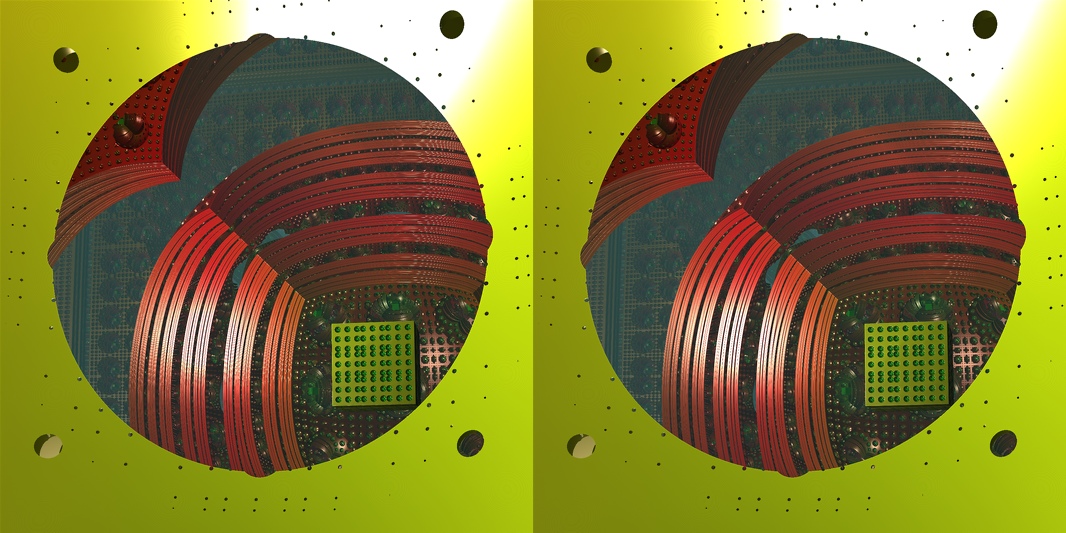
That all is not perfect, but the improvement is obvious, left the previous version without r-factor but with 3x3 aliasing, right the additional function as described:

Logged
KRAFTWERK
Global Moderator
Fractal Senior
******
Posts: 1439


Virtual Surreality


WWW
« Reply #1 on: May 26, 2010, 09:24:21 AM »

Looks good!  afro
Logged

hobold
Fractal Bachius
*
Posts: 573


« Reply #2 on: May 26, 2010, 05:12:03 PM »

Well done! Highlight aliasing is one of the tougher nuts to crack. The "deviations of the normals" are in fact the local curvature of the surface, which is the exact thing you need to monitor. Highlights are actually reflections of light sources. And the direction of the reflected light ray varies all the more, the more curved the surface is. Thus the local curvature is an indication for how much a small bundle of nearby view rays (e.g. all those originating from one specific pixel) are fanned out / spread apart after the reflection.

This widening of the fan in turn causes the rays to subsample the reflected image, and eventually results in improper rendering of the reflected light source, i.e. the highlight.
Logged
Jesse
Download Section
Fractal Schemer
*
Posts: 1013


« Reply #3 on: May 26, 2010, 10:50:56 PM »

Well done! Highlight aliasing is one of the tougher nuts to crack. The "deviations of the normals" are in fact the local curvature of the surface, which is the exact thing you need to monitor. Highlights are actually reflections of light sources. And the direction of the reflected light ray varies all the more, the more curved the surface is. Thus the local curvature is an indication for how much a small bundle of nearby view rays (e.g. all those originating from one specific pixel) are fanned out / spread apart after the reflection.

Yes, we can say that the r-factor simulates somehow the spreading of the light by the specific surface reflections.
It is still a compromise, in general, you would sum up all the reflected light of all little fractional parts from the surface by calculating their normals and dot-products with the light source(s). But this wont work when you want to adjust the light sources in realtime afterwards  smiley

That explains also why the result is not perfect, on an edge, the r-factor cant say if the surface bends towards an angle that reflects more light, it will normally decrease the specular light, what solves the biggest problems but leaves some light steppings.
Because this function doesnt need additional time compared with the default smoothing of the normals, i can live with it.
Logged
Pages: [1]   Go Down
  Print  
 
Jump to:  

Related Topics
Subject Started by Replies Views Last post
Anti-aliasing for pro results Images Showcase (Rate My Fractal) twinbee 4 7732 Last post September 26, 2008, 06:59:21 PM
by twinbee
Anti-aliasing renders in Mandelbulb 3D Help & Support PrimitiveMind 2 885 Last post October 17, 2010, 07:03:00 PM
by PrimitiveMind
aliasing vs anti-aliasing Non-Fractal related Chit-Chat teamfresh 4 3839 Last post November 29, 2010, 08:20:27 PM
by teamfresh
Simple anti aliasing / supersampling help! Programming richardrosenman 6 2468 Last post April 15, 2011, 02:41:21 AM
by Softology
Aliasing mandelbub 1.695 Mandelbulb 3d Skizzo 3 1888 Last post April 27, 2011, 02:14:34 PM
by bib

Powered by MySQL Powered by PHP Powered by SMF 1.1.21 | SMF © 2015, Simple Machines

Valid XHTML 1.0! Valid CSS! Dilber MC Theme by HarzeM
Page created in 0.364 seconds with 24 queries. (Pretty URLs adds 0.012s, 2q)