|
cKleinhuis
|
 |
« Reply #15 on: March 12, 2012, 09:20:14 AM » |
|
flowers image looks like fireworks  |
|
|
|
|
 Logged
|
---
divide and conquer - iterate and rule - chaos is No random!
|
|
|
|
kram1032
|
|
« Reply #16 on: March 12, 2012, 12:25:26 PM » |
|
Oh nice, I wasn't able to find flowers like that in type 7...
Classical conway's game of life is colored by what will happen next.... e.g. if in the next step a cell will be dieing, it's one color, if it will life, it's a different one and a third one if it will stay dead (usually black). Potentially you could add a fourth color by cells that will be born but I don't think I've seen that so far.
Then you could try making it more continuous by adding interpolatory colors based on how close a given pixel is to a state-change. E.g. if it will survive but it's at the edge of dieing, it could be the "I live" color, tinted to be closer to the "I die" color.
You could come up with all kinds of crazy coloring methods, coding as much information into that as you like. It will make the whole thing look a lot more dynamic and thus the non-static ones will become much, much more interesting.
Right now, simply because of the shapes they create, the static ones are more interesting.
Btw, what exactly is the difference in those types? How do they behave differently? I mean, obviously they do, but how, for instance, do you produce static images vs dynamic ones and how do the two static ones differ from each other internally? And how the five dynamic ones?
|
|
|
|
|
Logged
|
|
|
|
Tglad
Fractal Molossus

Posts: 703

|
|
« Reply #17 on: March 12, 2012, 01:07:34 PM » |
|
The static images are only based on the neighbour pixels around the next detail level up (pixels twice the size). So you can think of the pictures as more than single images, but as a filter which adds detail to any really low resolution monochrome image. The static types (6 and 7) start from a 4x4 random image when you see the result. You could probably seed them from just a single big 'on' pixel and they would look more symmetrical.
The dynamic images choose pixel on/off based on the next level up, the neighbours on the pixel's level and also the next (higher detail) level down. Much more interesting as they can move around, but it is a much bigger search space. Again, they aren't just a fixed animation, you could paint onto the image as it is running and interact with it. I'd like to add that feature too.
The reason there are different types is because the number of mappings (the number of possible rules) is so big that it makes sense to try out different subsets which constrain the search space. For example, if our rules are based on the 9 neighbours, 4 nearest parents and 4 children, then that makes 2^17 neighbour patterns to choose whether to turn the pixel on or off. Which means there are a total of 2^(2^17) mappings... a big number indeed.
All the mappings are constrained to have 90 degree symmetry, like a square. Which reduces the search space down a bit. Type 7 has 45 degree symmetry which is why it produces some patterns like flowers I guess.
Type 1 and 2 are based on the number of neighbours, not their relative positions, like conway's life. Type 2 counts itself in the neighbour count.
Type 3 treats the three layers around the pixel independently, but is still the biggest search space, which is why so many look like white noise.
Type 4 is like 1 and 2 but you choose on/off for each neighbour count. So more possibilities than 1 & 2
Type 5 is like type 4 but you count the number of children and parent (1 or 0) separately to the same level neighbours.
"That flowers image is particularly nice. Could you explain what is going on please in that one?"
Other that what I wrote above, I can't really... I just searched for an interesting pattern. I have attached the file though (rename extension to .ev7).
|
|
|
|
Logged
|
|
|
|
knighty
Fractal Iambus
Posts: 819
|
|
« Reply #18 on: March 12, 2012, 01:55:40 PM » |
|
awesome! I have to give it a try. 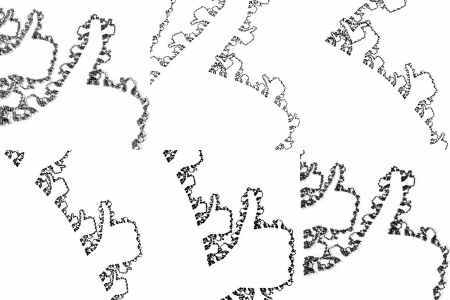 |
|
|
|
|
Logged
|
|
|
|
Jesse
Download Section
Fractal Schemer

Posts: 1013
|
|
« Reply #19 on: March 13, 2012, 09:17:46 PM » |
|
Really nice, i could spend hours just clicking the mutation areas Not tried all different types, but maybe an extension to more colors could give even more interesting mutations... found an older little program i made with up to 10 colors, you can test some saved files with "Laden" menu, proggy it is german/english mixed. The more possibilities, the more odd mutations i fear. ps: did the program also in 3d, but that's not really better. |
|
|
|
Logged
|
|
|
|
|
cKleinhuis
|
|
« Reply #20 on: March 13, 2012, 09:38:40 PM » |
|
no one scales to window size  how to reproduce the flower or the mechanical style that tglad showed ? |
|
|
|
|
Logged
|
---
divide and conquer - iterate and rule - chaos is No random!
|
|
|
Tglad
Fractal Molossus
Posts: 703
|
|
« Reply #21 on: March 14, 2012, 12:14:17 AM » |
|
Thanks Jesse, I like your program... nice to see something similar.
In mine, if you want to try out possibilities for a type (like type 3) then you have to keep on hitting '3', if you just click the top image repeatedly then it uses the same rule on the top image (with different random starting image) and the ones below are new minor variations of the top one. So you want to keep hitting '3' to try lots of variations... then only click on images once there is something interesting to pursue.
cK, copy the moreFlowers.txt from previous message into the program folder, and rename to moreFlowers.ev7. In the program hit '7' to swap to that type, then hit 'l' to load and type moreFlowers and enter. it should appear in the top image... if you click the top image it uses a new random start (4x4) image and the same rule.
The other images I showed are different save files that come with the download, the latest ones are the .ev7 files.
(sorry it doesn't scale... the images need to be a power of 2 in size)
|
|
|
|
|
Logged
|
|
|
|
|
cKleinhuis
|
|
« Reply #22 on: March 14, 2012, 12:16:09 AM » |
|
will try it right now, thanks for hinting...and added ev7 to allowed filetypes for attachments....
|
|
|
|
« Last Edit: March 14, 2012, 12:17:43 AM by cKleinhuis »
|
Logged
|
---
divide and conquer - iterate and rule - chaos is No random!
|
|
|
|
cKleinhuis
|
|
« Reply #23 on: March 14, 2012, 12:28:54 AM » |
|
i downloaded the program, but it just has 6 as maximum number to input .. . pressing "7" does not lead to a "Now using type x" message ... ;( but i got nice cloud shapes with the standard setting ... and somehow inverted results ... the upper right thing seems to just copy the image to itself at smaller scales ... after a while nothing moved anymore, but i got those neat tech-like structures and could explore them, but nothin moved ... |
|
|
|
Logged
|
---
divide and conquer - iterate and rule - chaos is No random!
|
|
|
|
cKleinhuis
|
|
« Reply #24 on: March 14, 2012, 12:30:52 AM » |
|
and how to vie an image as "just this image"?
|
|
|
|
|
Logged
|
---
divide and conquer - iterate and rule - chaos is No random!
|
|
|
|
cKleinhuis
|
|
« Reply #25 on: March 14, 2012, 12:37:16 AM » |
|
that thing is definately creating interesting structures ... it is fuzzling me a bit to not understanding what is going on ... have to read beginning of thread ... i wonder if those structures would scale ... but it seems for this they have to be rendered at a much bigger scale ... or it just does not work definately we have a method here that needs to be investigated a bit further! tglad arent you happy to already have discovered the mandelbox ?  (no offence, just jokin'!) |
|
|
|
|
Logged
|
---
divide and conquer - iterate and rule - chaos is No random!
|
|
|
|
kram1032
|
|
« Reply #26 on: March 14, 2012, 01:10:50 AM » |
|
I guess you figured it out by now but:
To change type, select the command shell so it's the active window and then press the corresponding type number.
Same goes for saving and loading.
The biggest top image is the one that's in use at any given time.
The six images of same size below it are clickable and are modified rule-sets so you can control what kind of shape you want.
(The top image is clickable too but that just initializes with new starting conditions while keeping the rules the same)
|
|
|
|
|
Logged
|
|
|
|
Tglad
Fractal Molossus
Posts: 703
|
|
« Reply #27 on: March 14, 2012, 01:27:35 AM » |
|
cK, it sounds like you have an older version of the exe, the latest version is always available at https://sites.google.com/site/tomloweprojects/scale-symmetry/automataFinder (you need to extract the zip somewhere in order that it can load the example files). EDIT- The latest zip on the site now allows you to swap between the normal view, single 512x512 and single 1024x1024 by pressing the 'f' key. The biggest view will slow down a bit on most computers... it isn't hardware accelerated. |
|
|
|
« Last Edit: March 14, 2012, 05:17:28 AM by Tglad »
|
Logged
|
|
|
|
Jesse
Download Section
Fractal Schemer
Posts: 1013
|
|
« Reply #28 on: March 14, 2012, 01:12:54 PM » |
|
The interface is quite easy, no problems with it! Wondering if it would be difficult to write it in OpenGL for example, my experience with it is just to poor. If it is ok for you i would like to copy your idea of layers and see if i get something interesting with more colors but a simple type of rules, as i used in my program. I used MMX (i guess this is also a kind of hardware accelerated, my CPU is quite hard i guess ), so it should be fast enough. Btw, i once did the original game of life with MMX and get a new generation for one pixel in only one CPU clock, guess how this could be done? |
|
|
|
|
Logged
|
|
|
|
hobold
Fractal Bachius
Posts: 573
|
|
« Reply #29 on: March 14, 2012, 02:39:32 PM » |
|
Btw, i once did the original game of life with MMX and get a new generation for one pixel in only one CPU clock, guess how this could be done?
I have heard of a faster game of life implementation with look up tables: A 4x4 neighbourhood was used as a 16bit index, and the table contained the center 2x2 pixel results of the next generation. A lot of trickery was needed with memory layout of the pixels to do this faster than one lookup every four cycles. These days, you could keep a 6x4 neighbourhood in a 16MB sized table, and look up a 4x2 result. The highest end CPUs do have enough cache ... |
|
|
|
|
Logged
|
|
|
|
|


 October 22, 2006, 11:24:56 PM


 Dilber MC Theme by HarzeM