More than other art-forms, fractals tend to benefit most from decent anti-aliasing. What I've found out over the past couple of days is how much processor time is needed to obtain really smooth results. I used to double the width and height of each image and downsample to the proper resolution. This does indeed definitely help the image look more fluid than usual.
However, it turns out that sampling 8x8, 16x16 or even as much as 32x32 per pixel (i.e. 1024 times slower!!!) for many images will produce much crisper results. Few fractals demonstrate this better than this ultra-fine sponge texture (still from the standard Mandelbrot) which I have rendered versions of below for comparison.
Enjoy...
Here is the default 640*480 pixel image. It looks okay, but let's see what happens when we downsample...
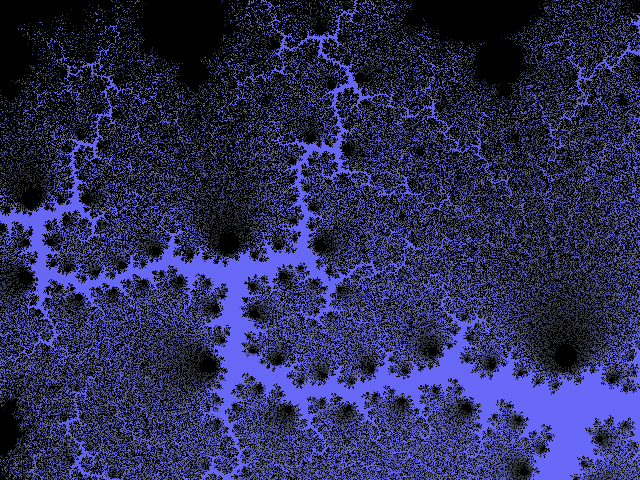
Here we have the same image but downsampled from 1280*960 back to 640*480. Already, it's looking much better. But can you notice the noisy artifacts? Can we improve on this?
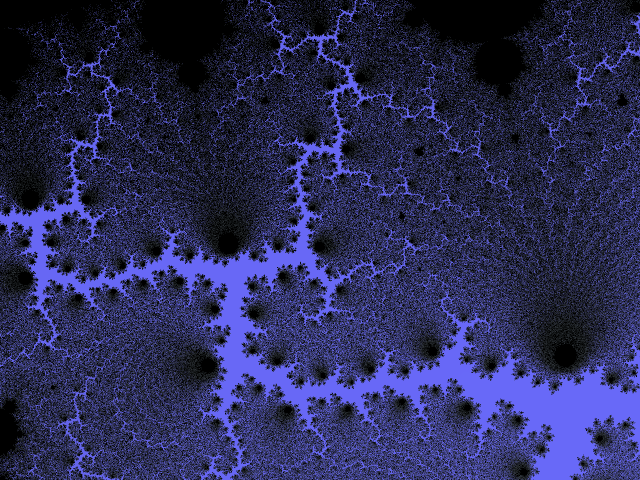
Downsampled from 2560*1920 back to 640*480. Again, even smoother than before. This could be easily mistaken to look as good as it could, but better is possible...

Getting near perfect, this is 64x times slower than before, but the results definitely show. A good compromise between detail and speed. (Downscaled from 5120*3840 to 640*480)

The longest I was willing to wait (and the maximum size my PC could handle is this whopping 10240*7680 resolution image downscaled to 640*480. All the details shine through, and noise is at its lowest.

Many eyes will probably see differences beyond even that level of detail, but I'm not sure how many would be willing to wait for the result

What downsampling scales do users here use for generating their fractal images out of interest?
Here are some images at bigger resolutions for wallpaper purposes:
1024*7681280*9601600*1200


 November 29, 2010, 08:20:27 PM


 Dilber MC Theme by HarzeM